WEB
In your browser
No downloads, no client. Open the page and you are on the platform, on phone or PC alike.
MetroSim
Everything MetroSim brings: cab, platform, rooms, control centre, avatars and a metro that runs by itself.
The simulator
Simulator screenshots: the start screen, L2, L3 and L11 platforms, and the track map. Tap a picture to enlarge it.
One world. You spawn on L2, from Paral·lel to La Pau, or on L3, from Lesseps to Liceu.
See which trains are running and where they are heading. Or stay in free view and wait for an AI train.
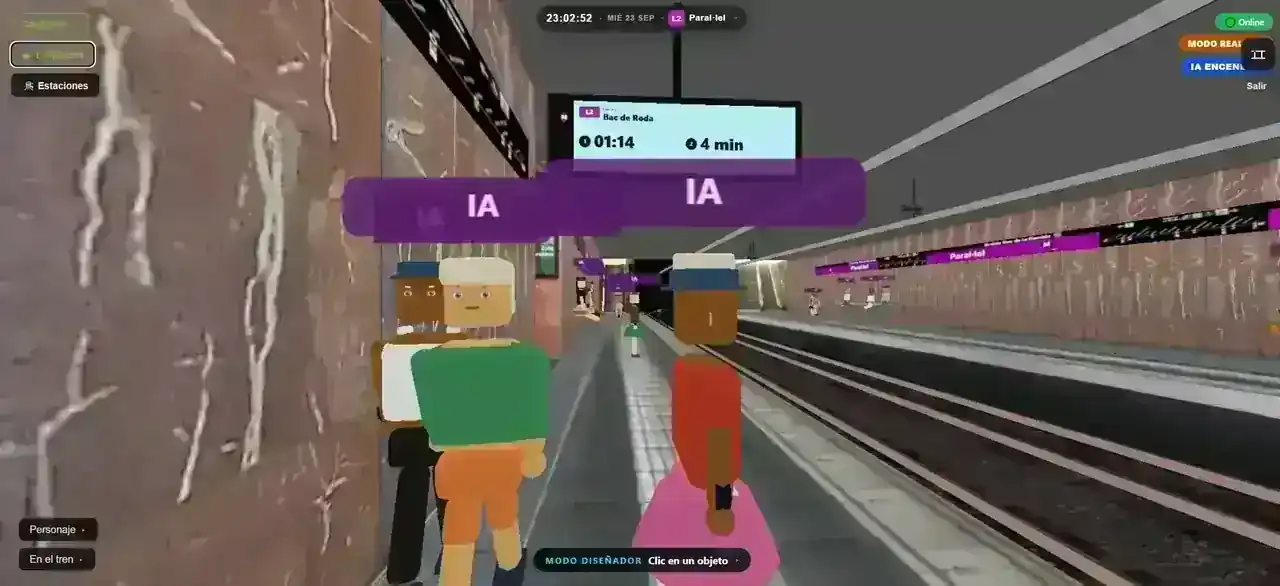
First person at Paral·lel, among passengers. The SIU shows the next train to La Pau.
Body, face, hair, clothes and accessories. Others see the same avatar on the train and the platform.
Signals, points and stations from Paral·lel. Follow the traffic without leaving the platform.
L2 terminus. Stairs to the concourse, the departure signal and the purple station sign.
Clot platform, with the tunnel mouth and the purple L2 stripe on the wall.
The SIU announces the next train as the platform fills with passengers.
An L3 platform, in green. Passengers waiting and the SIU with the next train to Liceu.
Features
Three lines: L2, L3 and L11. Switch between them; each has its own trains and signals. You choose: take the cab or stay on the platform.
No downloads, no client. Open the page and you are on the platform, on phone or PC alike.
2000, 3000 and 500 series with ATP panel, ATO, speed limits and train-stop if you run a red.
Walk your chosen line’s platform, at Sant Antoni, Lesseps or Trinitat Nova, wait for the train and board through any door.
There is L2, L3 and L11, and you can switch. Each has its own service, signals and fleet. The Passeig de Gràcia L2↔L3 walking link is in.
Real red, yellow and green. Points, track circuits and line stops from the CCM.
A control-room style diagram: occupancy, AI trains, drivers and platforms at a glance.
With no driver, the AI keeps the headway. At the terminus the driver steps off, walks to the other cab, and the train sets off. Turn it off when you want to run the line yourself.
Community
The main room is the official line: L2, L3 and L11, which you can switch between, run by the Control Centre. If you prefer your own, create a public or private room and invite whoever you like.
L2, L3 and L11 in the same room. Switch lines whenever you like and run alongside whoever is in.
Anyone can join, up to the cap you set. Great for an open service or meeting up without sharing a link.
Not listed. Share it with a link and, if you like, lock it with a password.
— players in the simulator now
Take a train and everyone sees you go by. Run a red and the train-stop hits for everyone.
Climb into their cab or any car. The platform and doors follow that run.
On foot on your line’s platform: Sant Antoni on L2, Lesseps on L3 or Trinitat Nova on L11. The map shows who is driving and who is walking.
Points, occupancy and trains belong to that room. Switch between L2, L3 and L11, but each keeps its own trains. With no driver, the AI fills the gap.
Platforms
On L2, L3 and L11 platforms the SIU shows how long until the next train. From the RDT you can set a STOP: trains halt at the next station and stay until you resume, if there is an incident.
A minutes-and-seconds countdown for the first train and minutes for the second. L2 in purple, L3 in green and L11 in lime, with destination, direction and time. During a STOP, the display warns of the incident.
Set a line STOP and every train finishes its run to the next station, opens its doors and waits. Resume once the incident is over. It also holds trains running ahead of the headway.
The first slot counts down to the second. You see Entra, Surt or the time left, updated from the real fleet.
The second train shows in minutes. With no service, the display loads information instead of inventing a timetable.
One switch. Trains stay at the platform. The game shows the STOP warning; the SIU shows the altered-frequency text.
The RDT watches the rotation: if a train arrives early, it is held at the station to keep the headway.
On the platform
Every platform has a yellow help column: the intercom. Walk up and a menu pops up, The Sims style. The first action is calling the control centre, with the same tones, accept, reject, mute and hang up as in the cab.
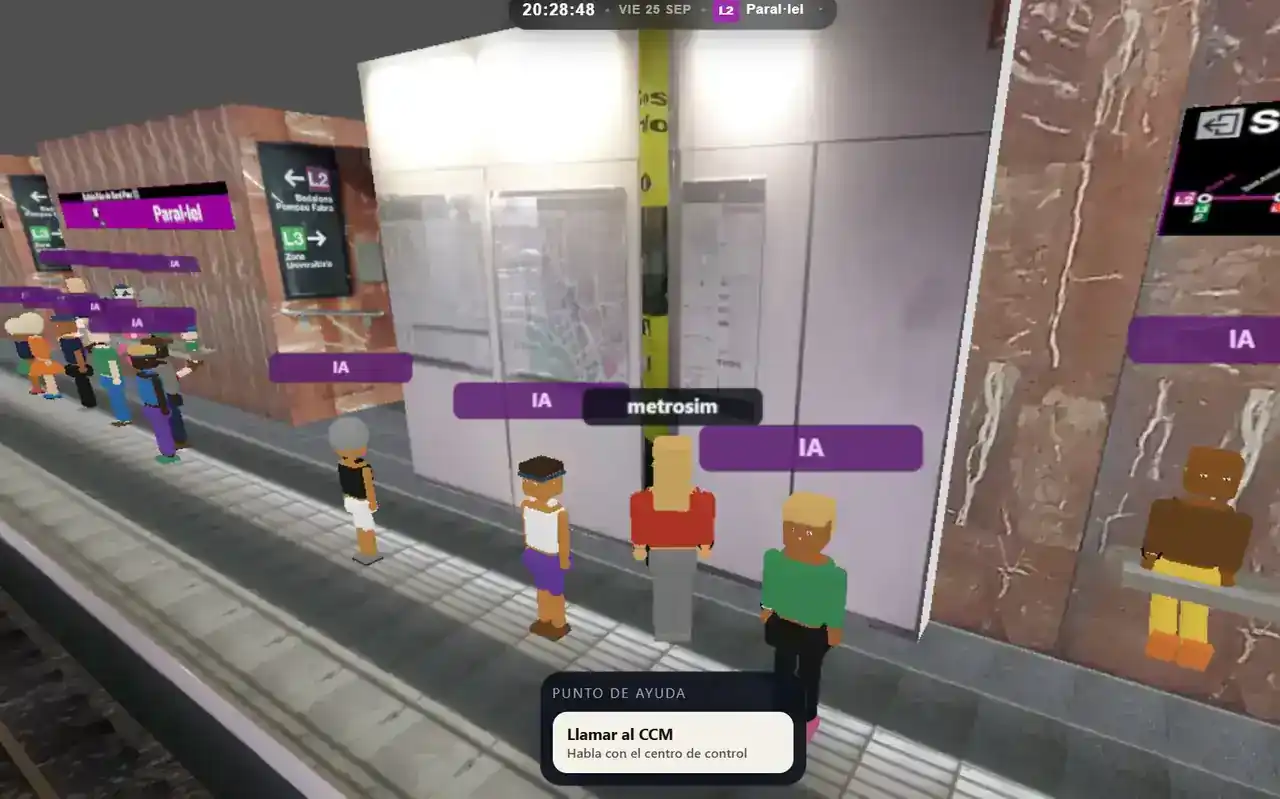
The intercom is the yellow column between the station maps. Stand in front of it and it is ready.
“Help Point” appears with the Call CCM button. Walk away and it closes. It is on foot only: board a train and it hides.
The same call as from the cab. The tone rings, the operator accepts or rejects, you can mute and hang up any time.
At the control centre the call comes in as a passenger, showing your station and line, for example Paral·lel on L2.
The intercom is the first. The same menu will offer other actions as more objects become interactive.
The column is on every L2, L3 and L11 platform. Any station works: walk up and call from there.
Your character
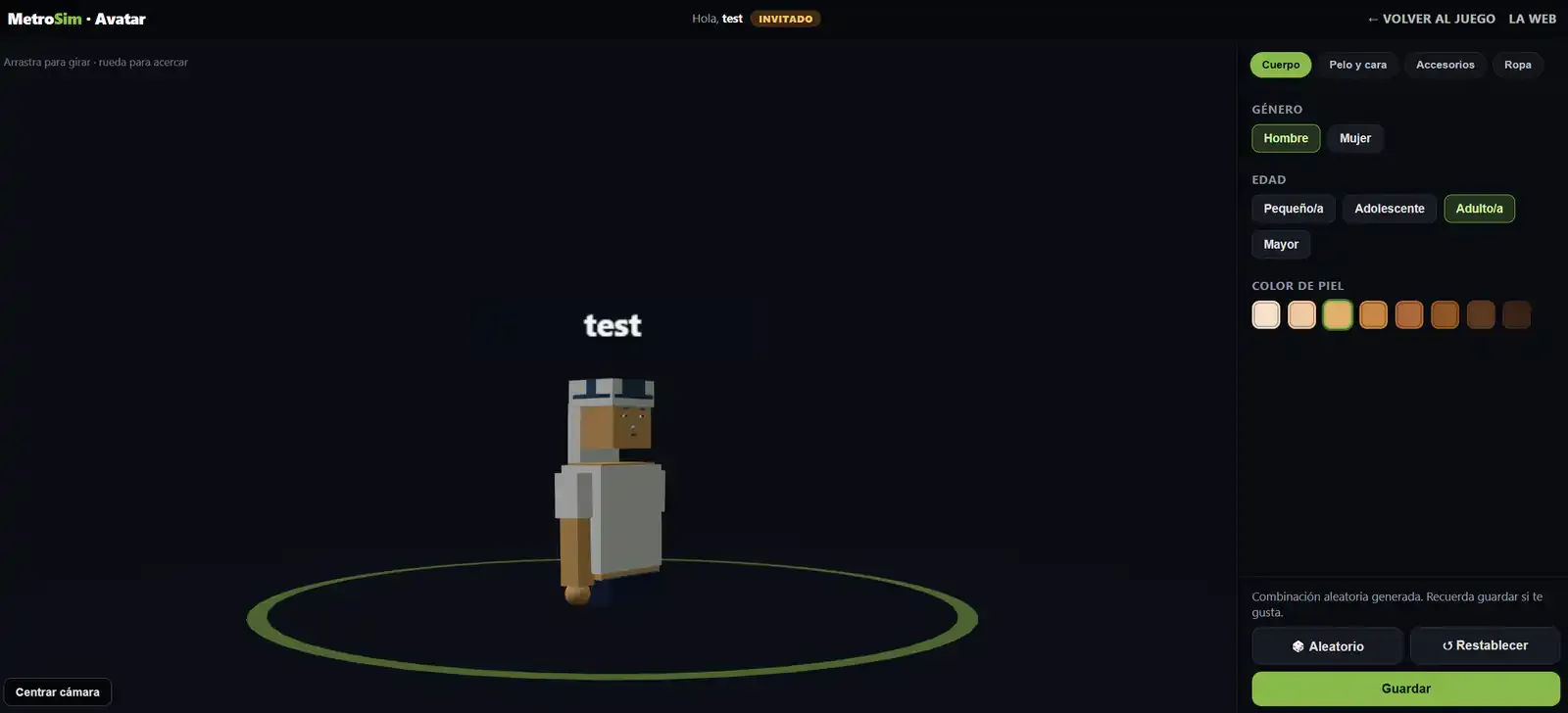
A 3D editor in your browser: body, face, hair, clothes and accessories. Everyone sees the same character on the train and on your line’s platform. With an account it is saved; as a guest, only for that session.
Detail
The platform is not a backdrop. People wait seated, and someone is driving in the cab. At the terminus, AI drivers step off, walk to the other cab and the train sets off.
A driver sits in the active cab, visible from the platform on L2, L3 and L11. When you drive, they move aside so you can see.
At Paral·lel, La Pau, Lesseps, Liceu, Trinitat Nova and Can Cuiàs the driver leaves the cab, walks the platform to the far end and enters the other cab. The train waits with doors open, then closes and leaves the other way.
Passengers walk in. Some take the benches, others stand watching the track until the train opens.
When the doors open they queue, board and ride in the car. Stops fill and empty the train; nobody appears from nowhere.
Every passenger has a different face, hair and clothes. Others see the avatar you create on the platform and the train.
If you are not driving, service goes on: signals, platform-side doors and trains keeping the headway. Feel free to just watch.
Control Centre
The Metro Control Centre (CCM) shares the world with the drivers. Run the line live, L2, L3 or L11: tracks, signals, points, trains, announcements and short workings.
Coming soon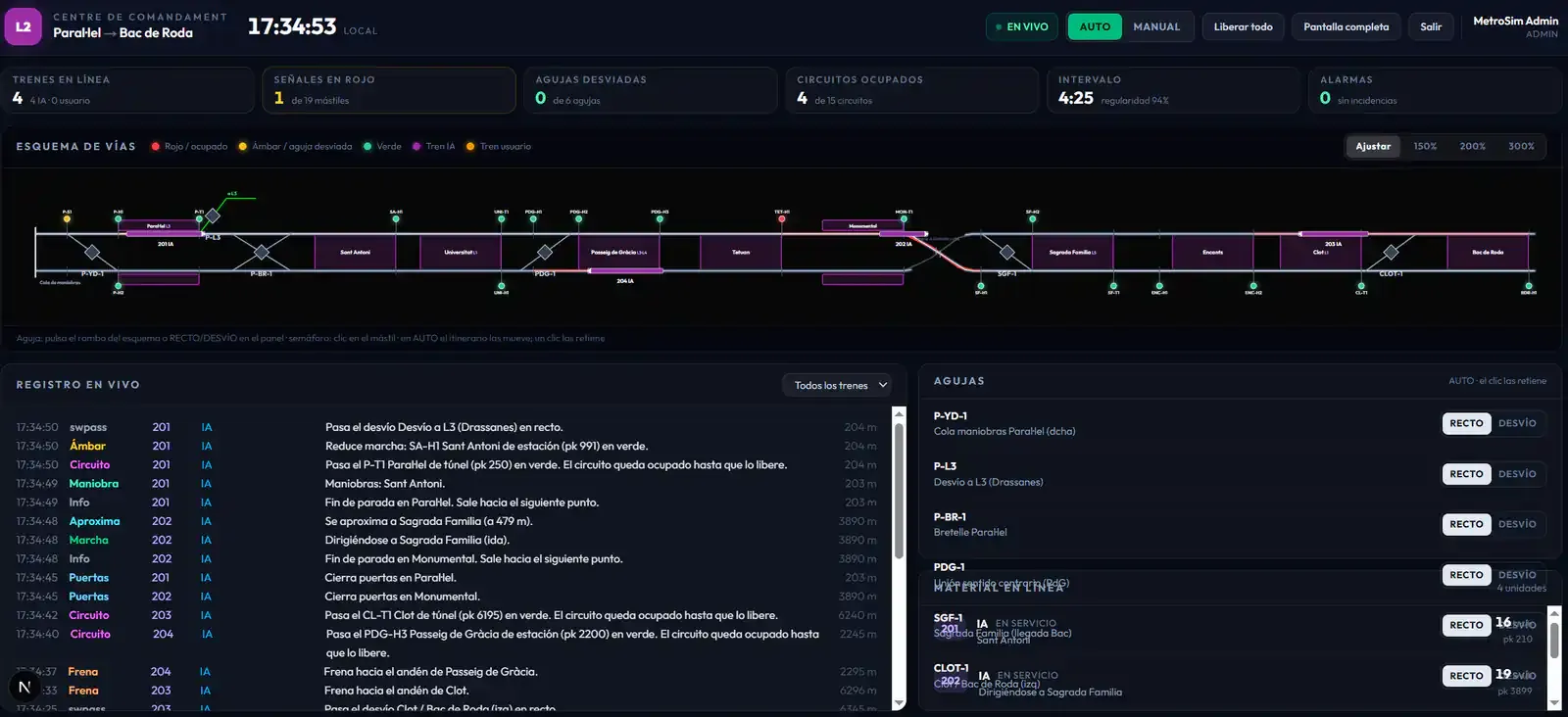
L2 from Paral·lel to La Pau, L3 from Lesseps to Liceu and L11 from Trinitat Nova to Can Cuiàs: occupancy, signals and who drives each train.
In AUTO the timetable sets the points. In MANUAL you take over. Each line is run separately.
Throw a switch, lock a point or release everything when service gets stuck.
Force an aspect, drop an override and reset a driver who ran a red.
Runs, doors, track circuits, braking and approaches, second by second.
Trains on the line, occupied circuits, regularity and alarms. You see whether service holds up.
Shorten the route between two stations, skip stops or turn back before the terminus. The AI and displays follow.
Speak live on the mic. Pick one stop, several or the whole line, and passengers there hear you. You can also record announcements and play them when needed.
From a platform stroll to full service with ATP and train-stop.
Drive without pressure: forgiving physics so you can focus on stations, doors and the map.
Limits, signal aspects and train-stop. Run a red and the CCM has to reset you.
No client, no installs. Your browser is enough.
Play as a guest or reserve your name. Pick a password if you want to come back.
Join L2 or L3 and switch whenever you like. Drive a train, take over from the AI or stay a passenger.
Slow on yellow, stop on red, open doors at the platform. The rest of the line is watching.
Free, in your browser, with the line waiting for you.